NetSuite Integration for Agricultural Operations | Nuseed | Ayoka
AYOKA CASE STUDY NUSEED ORACLE NETSUITE

Connecting Agricultural Operations to Oracle NetSuite from Field to Fulfillment

How Ayoka connected Nuseed's seed production, processing, lot-level inventory, quality controls, and fulfillment workflows with Oracle NetSuite.

NetSuite integrationSeed managementProcessing & WIPLot traceability
01 / THE BUSINESS CHALLENGE

A seed operation depends on more than its ERP.

Grower contracts, field inspections, harvests, seed processing, laboratory results, warehouse inventory, and customer orders each create information that another team needs to act on. When those records are disconnected, a routine question can become a search across people, databases, and departments.

For Nuseed, the challenge was to connect the specialized work happening across the agricultural operation with the products, orders, warehouses, subsidiaries, and inventory transactions associated with Oracle NetSuite.

A lot's journey illustrates the complexity: Where did the seed originate? What processing did it undergo? Has quality approved it? Which warehouse holds it? Is it available for a particular order? Will the actual shipment reconcile with the ERP?

harvesting seed

The value is in carrying the right business relationships through every handoff, from the field to the customer.

02 / Business capabilities and operational value

Business capabilities and operational value

ERP data disconnected from field activityNetSuite masters/orders link to field, planting, inspections and harvest; improves cross-functional visibility.
Lot-level stock hard to traceLot/lot-location event model, history, child relationships, inventory and physical counts; supports investigation and accountability.
Production conversion not visible centrallyProcessing jobs capture input/output lots, conversion types, priority, status and dates; improves operational WIP tracking.
Quarantined stock mixed with normal stockNonconforming stock flags plus separate NetSuite warehouse transfer semantics; supports controlled stock handling.
Manual shipment re-entrySales/transfer fulfillment payloads transmit lot, QA and pallet details via middleware and callback reconciliation.
Unmonitored integration failuresSync administration, error fields, timestamp, email notification and targeted retries; supports faster failure recovery.
Discrepant ERP vs floor stockNetSuite/SMP variance report exposes SKU/warehouse differences with inventory snapshots and availability context.
03 / THE NETSUITE APPROACH

Keep enterprise records connected to the work on the ground.

Different teams need different tools. The design connected specialized agricultural workflows to relevant NetSuite records instead of forcing every operational step into a generic ERP screen.

SPECIALIZED OPERATIONS

Nuseed Seed Management Platform

  • Field and production activity
  • Harvest and processing jobs
  • Lot locations, QA, quarantine
  • Pick lists, dispatch, exception review
↔
Approved integrations
and reconciliation
ERP & ENTERPRISE TRANSACTIONS

Oracle NetSuite

  • Products, customers, vendors
  • Grower contracts and orders
  • Warehouse and subsidiary references
  • Relevant inventory and fulfillment transactions

Integration that respects how work actually happens

The application uses NetSuite-linked identifiers and integration middleware so field activities, inventory, quality events, and order movements can remain associated with the correct enterprise records. The implementation includes Celigo-based transaction flows and a separate Jitterbit invoicing flow.

Transaction visibility matters after launch

Records can fail to sync or require reconciliation. SMP includes transaction-state tracking, an administration view, error notifications, and controlled retry functions. That operational follow-through is an important part of maintaining useful integration.

Holding seeds in hand
04 / WHAT AYOKA CONNECTED

One connected operating flow across six critical areas.

Ayoka developed the Seed Management Platform (SMP), purpose-built operational software connected with NetSuite-linked enterprise data and transactions.

01

Growers, fields & harvest

Associate grower contracts and products with planting activity, field inspections, estimated yield, and actual harvest events.

02

Production & processing WIP

Follow jobs through drying, sizing, blending, treating, packaging, and other processing steps, including input/output lots and status.

03

Lot-level inventory

Maintain lot identity, movement history, warehouse locations, physical counts, and comparisons against NetSuite inventory snapshots.

04

Quality & quarantine

Connect test results, approvals, release decisions, and nonconforming inventory to the lots and movements affected.

05

Orders & fulfillment

Link sales and transfer orders to actual pick lists, shipped lots, pallets, dispatch records, and warehouse receipts.

06

Integration exceptions

Record transaction states, flag failed synchronization, and support authorized review or retry of affected records.

05 / OPERATIONAL VALUE

Millions of dollars unlocked in global inventory valuation

The Seed Management Platform (SMP) is a web-based, subsidiary-aware operating system for seed production and inventory. It links agricultural field activity, lot-level stock management, quality-control tests, processing operations, and dispatch workflows to Oracle NetSuite ERP through integration middleware and direct application endpoints.

The defining characteristic is transaction-level continuity: a grower field and planned harvest can become lots, stock movements, processing outputs and fulfilled sales or transfer orders, with product, warehouse, subsidiary, and order references carried into NetSuite-facing messages.

Application capabilities

  • Oracle NetSuite-linked product, customer, vendor, warehouse, subsidiary, grower-contract, purchase-order, sales-order, transfer-order and inventory models.
  • Outbound REST integration payloads for purchase-order receipts, customer returns, vendor returns, sales/transfer fulfillment, transfer receipts, production/harvest, quality results, inventory requests and quarantine transfers.
  • Inbound HTTP response endpoints for fulfillment and EPR invoice callbacks; detailed interface-state persistence and a NetSuite Sync administration screen.
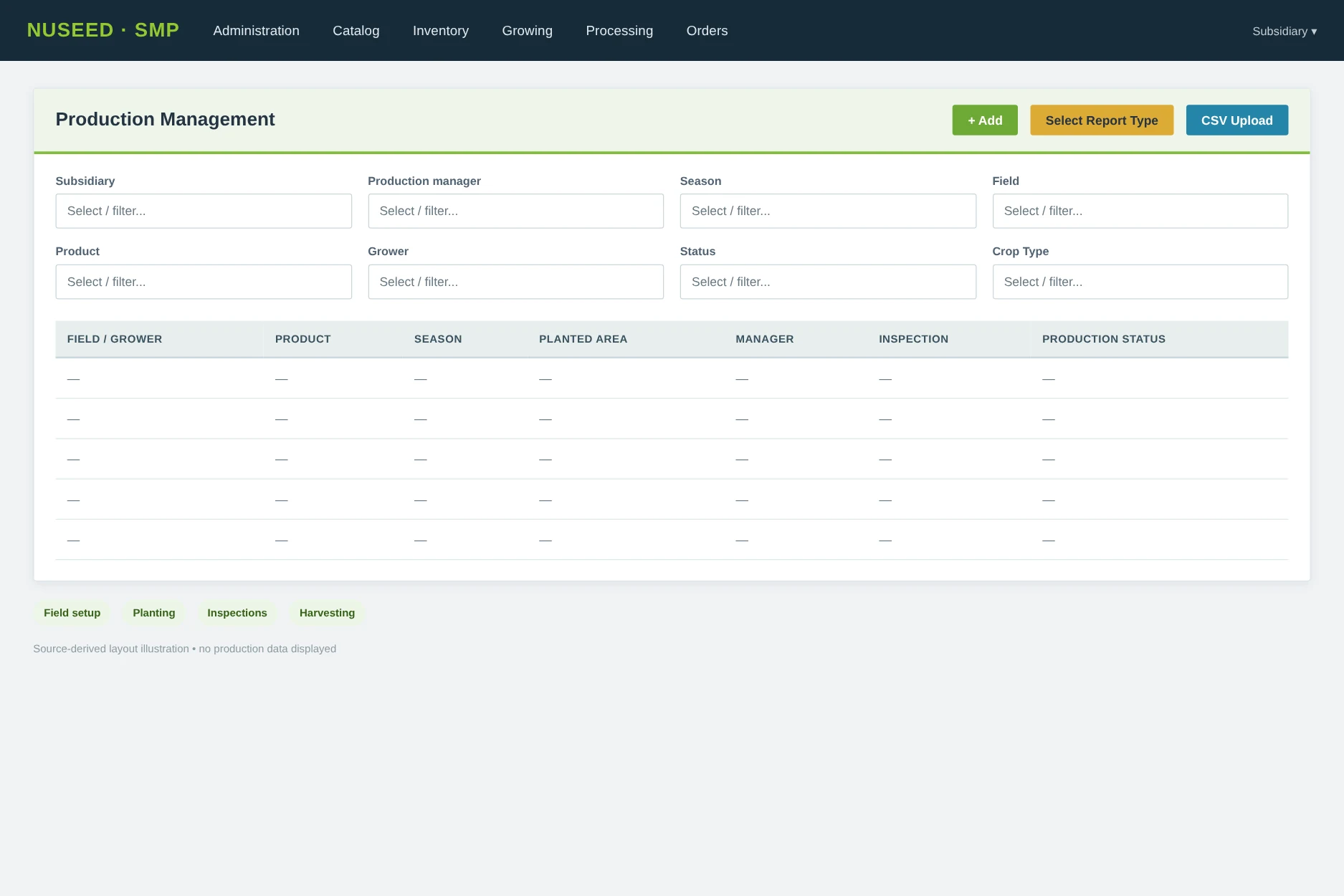
  • Production Management, field inspections, harvesting, lot history, physical counts, processing jobs, shipping manifests, QA approvals, CSV imports and reporting.
  • Role-/subsidiary-aware screens and service queries, browser-based interface, and API support for mobile field-inspection functions.
Visibility

Track work in process

Processing status, timing, input and output lots, and related orders can be reviewed together.

Accountability

Investigate discrepancies

Physical counts and lot-level records can be compared with NetSuite inventory snapshots.

Traceability

Follow lot history

Origin, quality, inventory movement, and fulfillment details remain associated with relevant lots.

06 / A LOOK INSIDE THE WORKFLOWS

Operational software that follows real work.

Reviewing test results
Field & harvest managementWork is associated with products, contracts, inspections and harvests.
Testing seeds in lab
Processing & WIPProcessing jobs connect inputs, outputs, priorities and status.
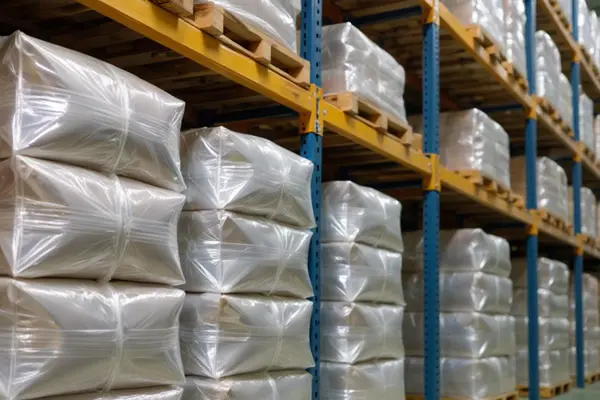
Seed storage in warehouse
Lot inventory & qualityLots can be reviewed against location and quality attributes.
07 / Seed lifecycle and production management

Seed lifecycle and production management

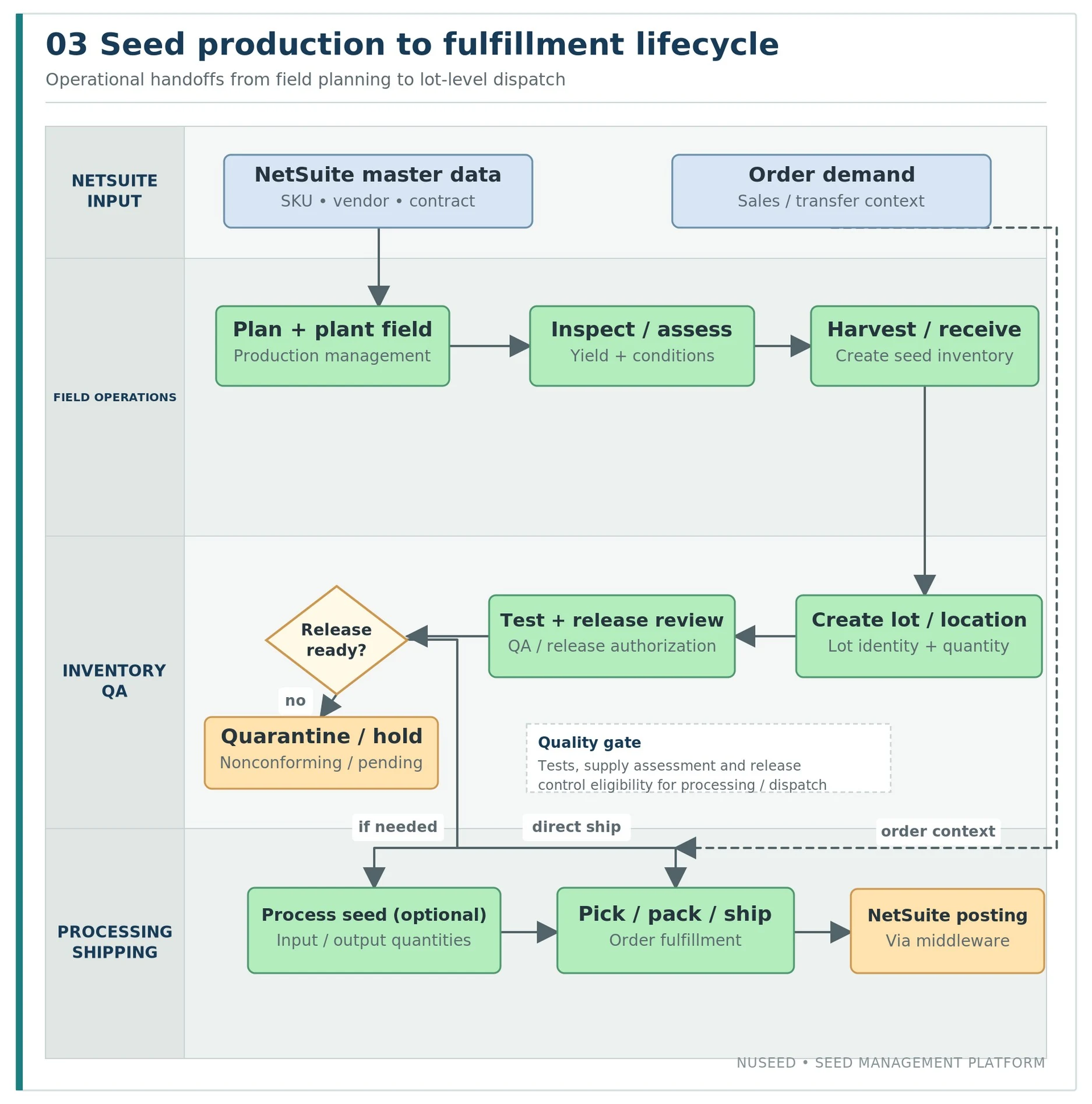
Nuseed agricultural lifecycle showing ERP master data and orders connected to field production QA processing and shipping
Figure 3. How ERP master data and orders connect to seed production, QA, processing and shipping.

Field creation, planning and inspections

Production Management revolves around GrowerContractField. A field record links planting rows and NetSuite products to geographic/area attributes, production manager, growing season, contract references, inspection results and harvest records. FieldInspection captures condition, estimated yield, location, agronomic observations, insects, weeds, diseases, off-type counts and nonconforming flags. Mobile APIs expose inspection-related operations.

Harvesting and lot creation

The production-management controller and inventory services connect harvested output to LotLocationPreliminary and Lot/LotLocation. NetSuiteEndpointHandler.Production distinguishes harvest from production, supplies contract quantities in contract UOM where available, and splits conforming from quarantine output. The output is traceable to source field/processing job and lot references.

Process planning and operational WIP

ProcessingJob stores status, importance/priority, input/output preliminary records, vendor, source and processor warehouses, related sales order, expected/actual dates and documentation. ProductionType covers drying, scalping, blending, sizing, treating, packaging, reworking, mixing cultivar, crushing and planting harvest, among others. These workflows support operational WIP visibility and conversion tracking; a separate NetSuite financial WIP cost-ledger interface is not presented.

08 / Inventory, lot traceability and reconciliation

Inventory, lot traceability and reconciliation

Core inventory behavior

Lot is the persistent seed identity (internal/customer lot number, item reference, quality values); LotLocation is the transaction/location record (quantity, warehouse-local location and bin, current flag, parent/child history, quarantine/nonconforming status, production source, transaction links and synchronization state). This separation is central to how SMP supports traceable stock movements over time.

Warehouse-specific Location records can be marked Internal, distinguishing SMP-only storage from ERP-reconciled locations. Quarantine conditions may map inventory to a nonconforming child NetSuite warehouse when preparing ERP stock/status transitions. PhysicalCount saves counts at the location level and provides printable CSV audit reports.

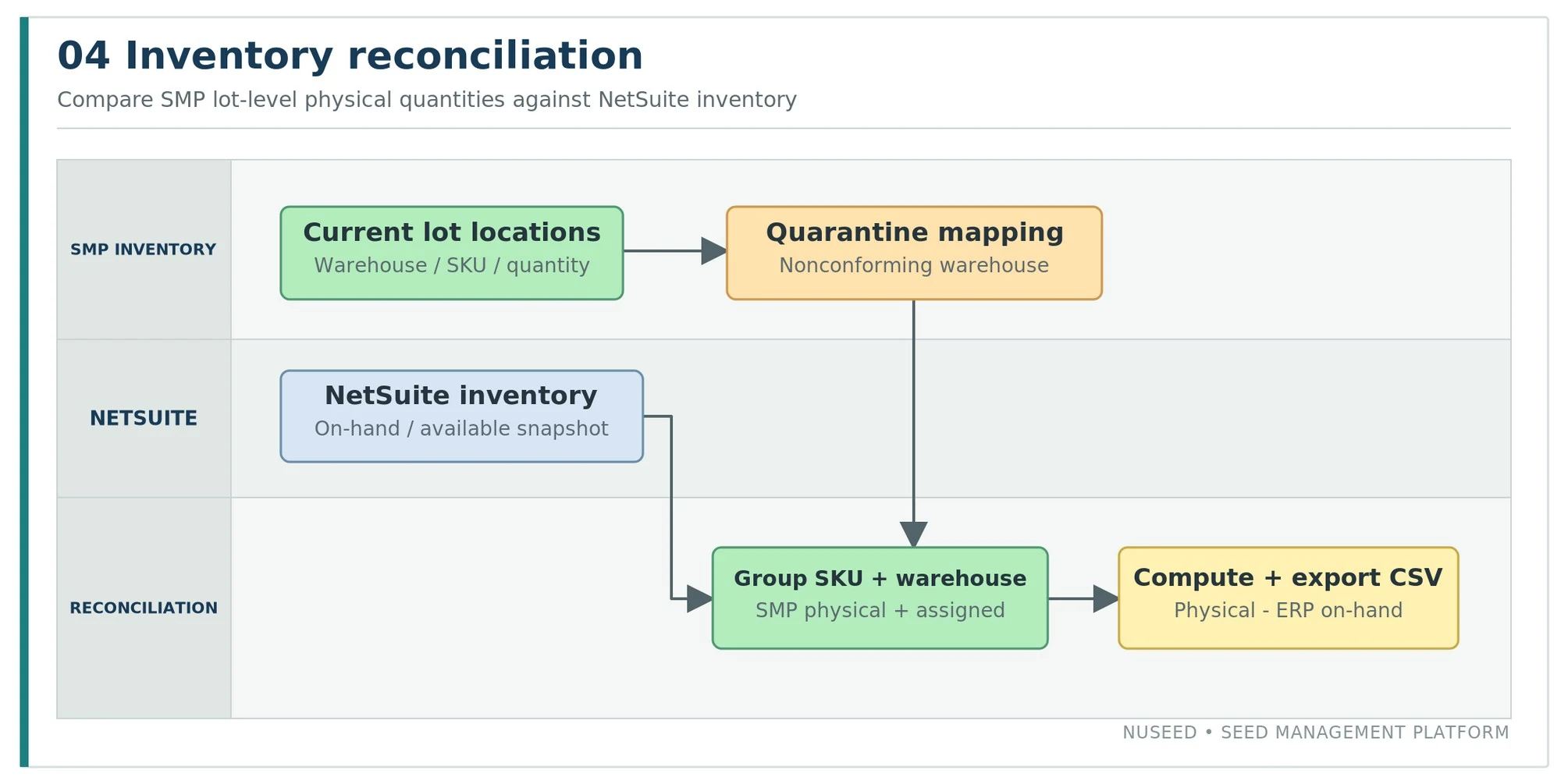
Nuseed physical versus NetSuite ERP inventory comparison
Figure 4. Implemented physical-versus-ERP inventory comparison. Difference is SMP physical quantity minus NetSuite on-hand.

Inventory reconciliation: NetSuiteInventoryReport groups both sources by product and warehouse, translates SMP quarantine to the correct nonconforming warehouse, calculates SMP physical and available quantities, and exports NetSuite on-hand, available, in-transit and on-order comparisons with as-of dates.

MetricImplemented calculation or metric
SMP physical quantitySum of current lot-location quantities for non-internal locations, with quarantine warehouse mapping.
SMP available quantityPhysical quantity less the application’s assigned quantity.
NetSuite on hand / availableStored NetSuiteInventory.OnHandCount and AvailableCount.
Variance / differenceSMP physical quantity minus NetSuite on-hand quantity; formatted for the CSV report.
Additional contextNetSuite in-transit and on-order quantities, inventory snapshot AsOfDate.
09 / Quality, release authorization and supply assessment

Quality, release authorization and supply assessment

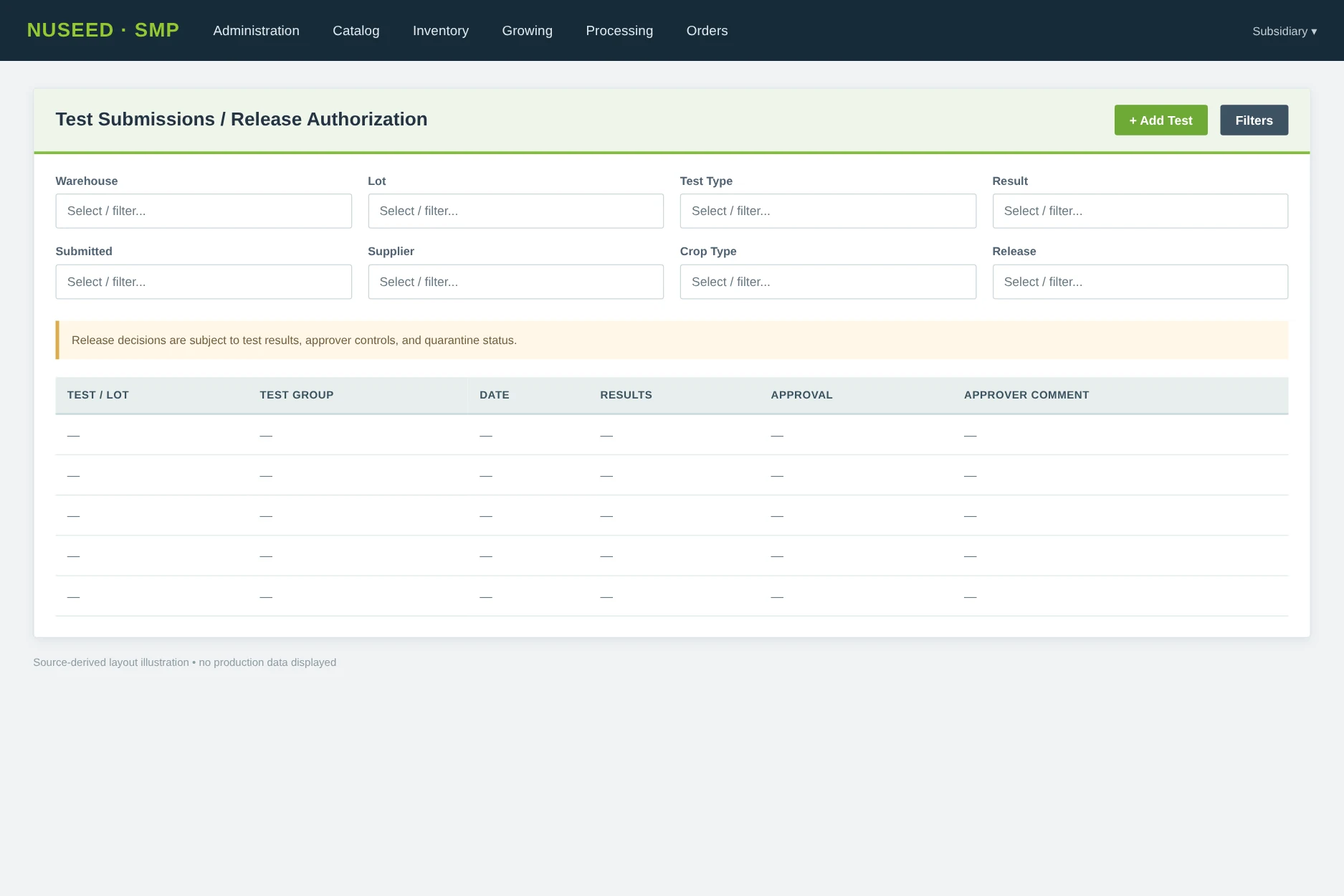
Test submissions may be associated with a lot, lot-location or preliminary lot and can include test parameters, result dates, notes, documents, expiry, release-authorization approvals, an approval key and approver comments. Test templates and generation-aware test filters are implemented as part of the current application.

The release-authorization flow has UI endpoints to present approval lists and approve/reject a submission; the application can retain requester/approver context and notify participants by email. Lot-level quality data can also be sent to NetSuite by the Celigo QualityControlTestResults operation.

SupplyAssessmentRating is persisted against inventory lots/locations and field inspections. A score can follow field-to-lot and lot-processing pathways under business-specific rules. This indicates operational gating and triage for quality/timing—not just passive test storage. Quarantine and nonconforming values are explicitly represented in receipt/production/fulfillment quantities.

10 / Customer orders, warehouse transfers and dispatch

Customer orders, warehouse transfers and dispatch

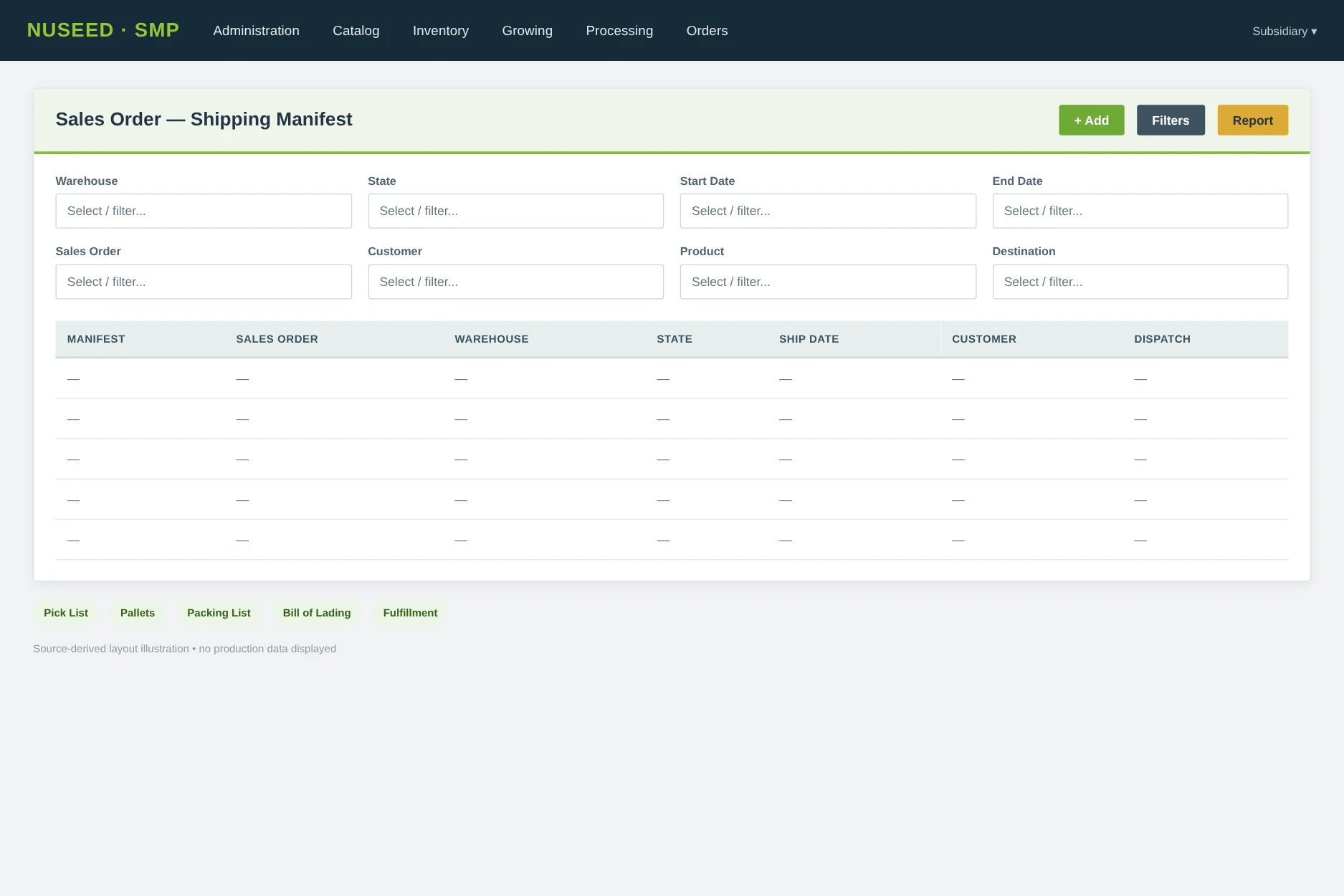
ShippingManifest manages order-linked dispatch records with shipping state, method, carrier, route, shipment date, tracking information, check-off lists and documents. PickList ties shipped lines to sales-order or transfer-order product lines, specific lots/locations, bins, packing positions, pallet quantities and invoice number. The user-facing views include sales and transfer shipping, receiving, pallet controls, packing lists, dispatch docket, pallet sticker and bill-of-lading generators.

The outbound NetSuite fulfillment is built from the real shipped lot movements, with sales/transfer order ID, line number, warehouse, lot-level quantity and quality, and pallet information. The inbound NetSuite callback resolves the transaction by SMP manifest ID, NetSuite order ID and date and updates the interface state, with sales invoice numbers stored where returned.

For interwarehouse transfer, the application implements both sending and receiving steps. A completed outbound fulfillment callback is used to invoke the corresponding inbound NetSuite transfer receipt for matching positive-side inventory records. This creates an explicit two-leg process rather than treating a warehouse transfer as a single local edit. Transfer-order records also include a consignment-customer relationship.

11 / Import processing and reporting services

Import processing and reporting services

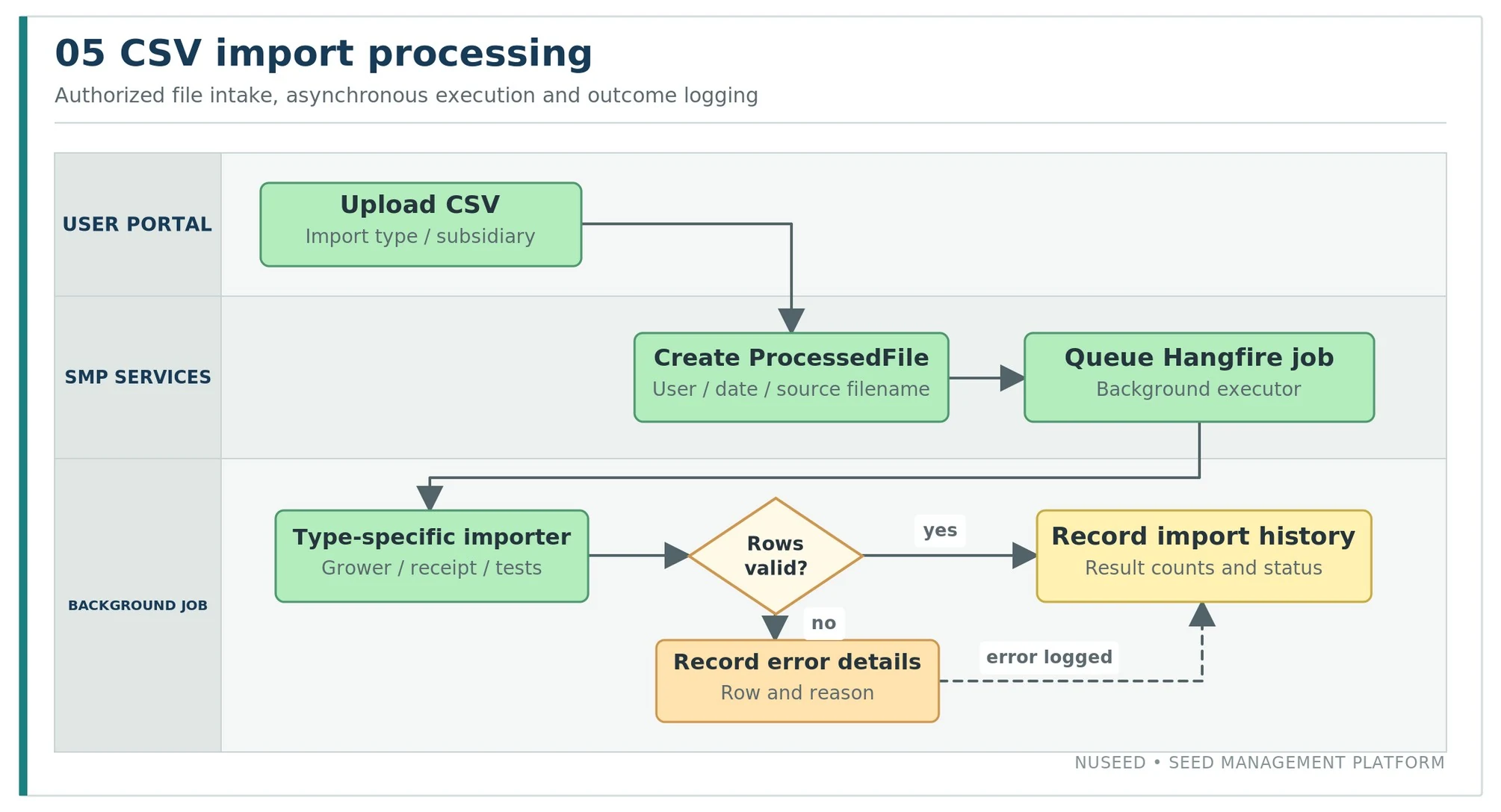
Nuseed CSV intake pipeline with database tracked processing and background execution
Figure 5. CSV intake pipeline with database-tracked processing and background execution.

The central Import screen validates the permitted import type, captures the uploaded file and creates a ProcessedFile record identifying user, subsidiary, filename, time, record count and error log. Hangfire then queues the corresponding import worker. Current ImportType values include Grain Trader, Grower, Harvest Declaration, Purchase, Test Submission, Test Template, Internal Transfer and Non Conforming.

The application also supports screen-specific CSV import/export and report generation. Report classes produce inventory variance, lot history, production/processing information, pick/dispatch paperwork, test reports and physical count exports. The report system is operationally useful both for user review and for downstream spreadsheet-based analysis.

Report / outputImplemented functionality
Inventory reconciliationSKU/warehouse inventory comparisons and variance exports.
Lot historyLot movement and transaction history reporting.
Processing job reportsProcessing job status, inputs, outputs and production reports.
Shipping documentationDispatch summaries, packing lists, pallet stickers and bills of lading.
Physical countsLocation-level physical-count quantities and CSV exports.
Test and product reportsQuality-control, test and product/inventory reports.
12 / Current logical database design

Current logical database design

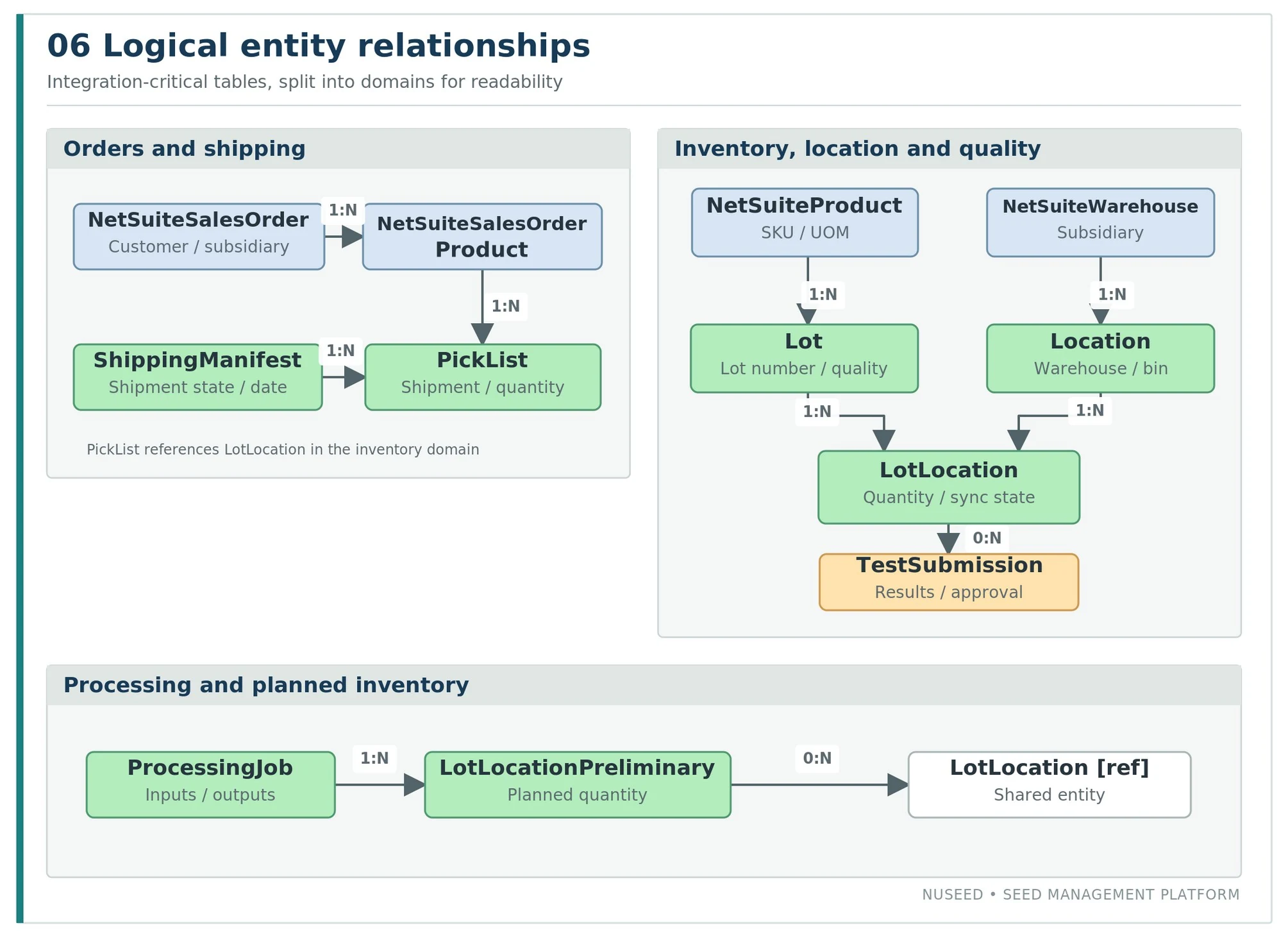
The application uses an Entity Framework Code First domain model and schema migrations. The diagram below selects integration-critical relationships instead of listing every entity. Cardinalities represent logical one-to-many relationships; several paths have optional foreign keys.

Nuseed logical entity relationship model for operational and ERP integration data
Figure 6. Selected logical entity-relationship model for key operational and ERP integration data.
EntityKey attributes / relationships
NetSuiteProductItemCode, ItemName, Generation, Classification, StockNetSuiteUnitOfMeasureId, NetSuiteProductComponents.
LotLotNumber, CustomerLotNumber, NetSuiteProductId, QualityData, QualityDate, AlternateSeedSize.
LotLocationQuantity, CreatedDate, LotId, LocationId, Bin, NonConformingSource, InterfaceStatus, InterfaceErrorDetails.
LotLocationPreliminaryExpected/actual quantity, origin and source references, planned/processed/harvest linkage.
NetSuiteWarehouse / LocationNetSuiteSubsidiaryId, child nonconforming warehouse; Location.Internal and SubNetSuiteSubsidiaryId.
ProcessingJobImportance, ProcessingJobStatus, warehouse/order links, commence/complete dates; output preliminaries.
ShippingManifest / PickListManifest state, shipping dates, product order lines, lot/bin/pallet detail.
TestSubmissionLot/LotLocation links, parameter results, IsApproved, ApproverComment, expiration and approval key.
NetSuiteInventoryAvailableCount, OnHandCount, InTransitCount, OnOrderCount, AsOfDate, SKU and warehouse FK.
13 / User-interface atlas

User-interface atlas

The following panels are illustrative reconstructions of current user-interface structure and controls. They are not live application screenshots, and sample grids intentionally contain no customer production records.

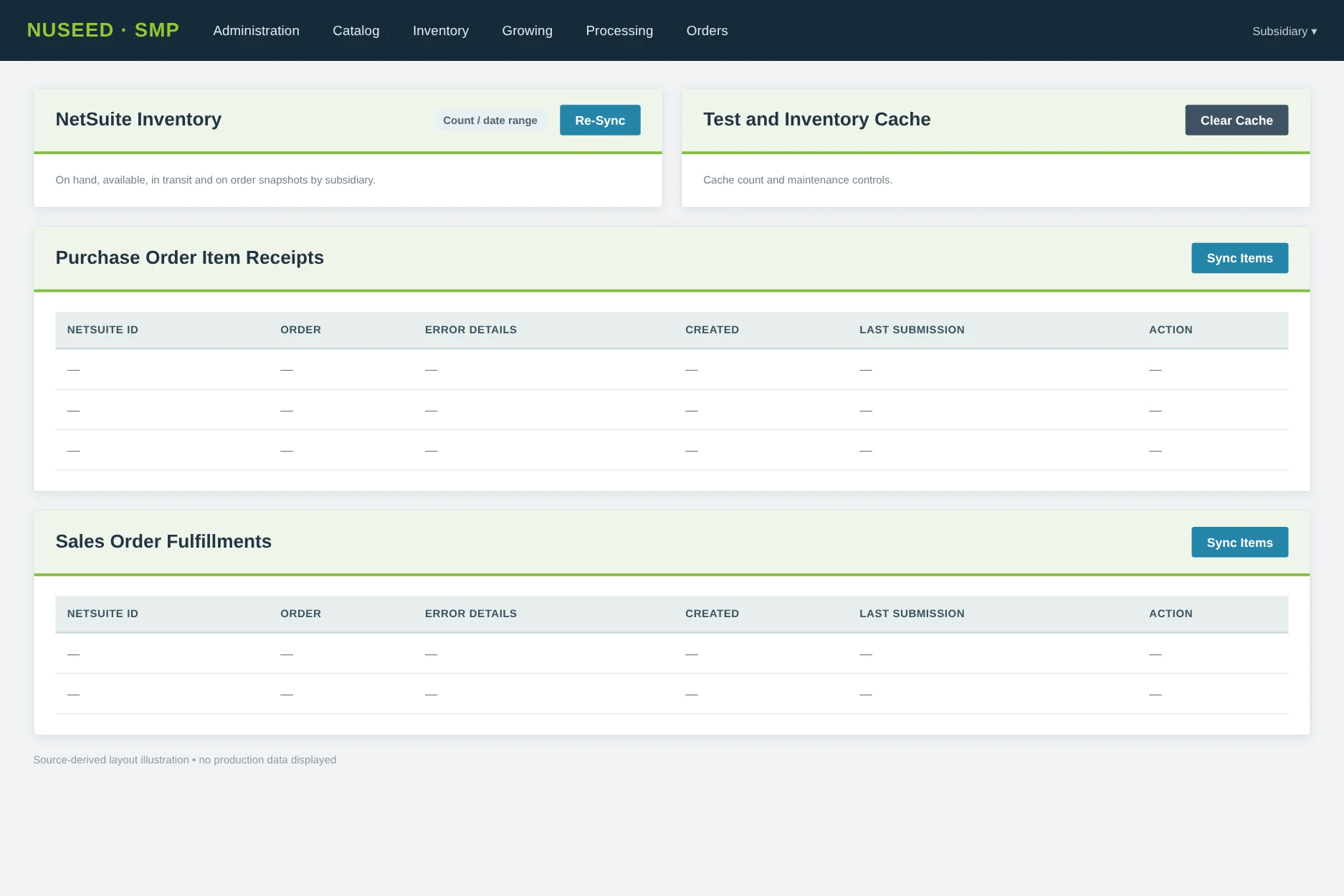
Nuseed Seed Management Platform NetSuite synchronization and transaction retry console

12.1 NetSuite Sync • operational integration console

NetSuite Sync provides visibility into ERP snapshot range and transaction failures; each actionable transaction category is shown conditionally when it contains records. Record rows link to related business transactions and show sync dates and interface error details. A retry action is permission-gated.

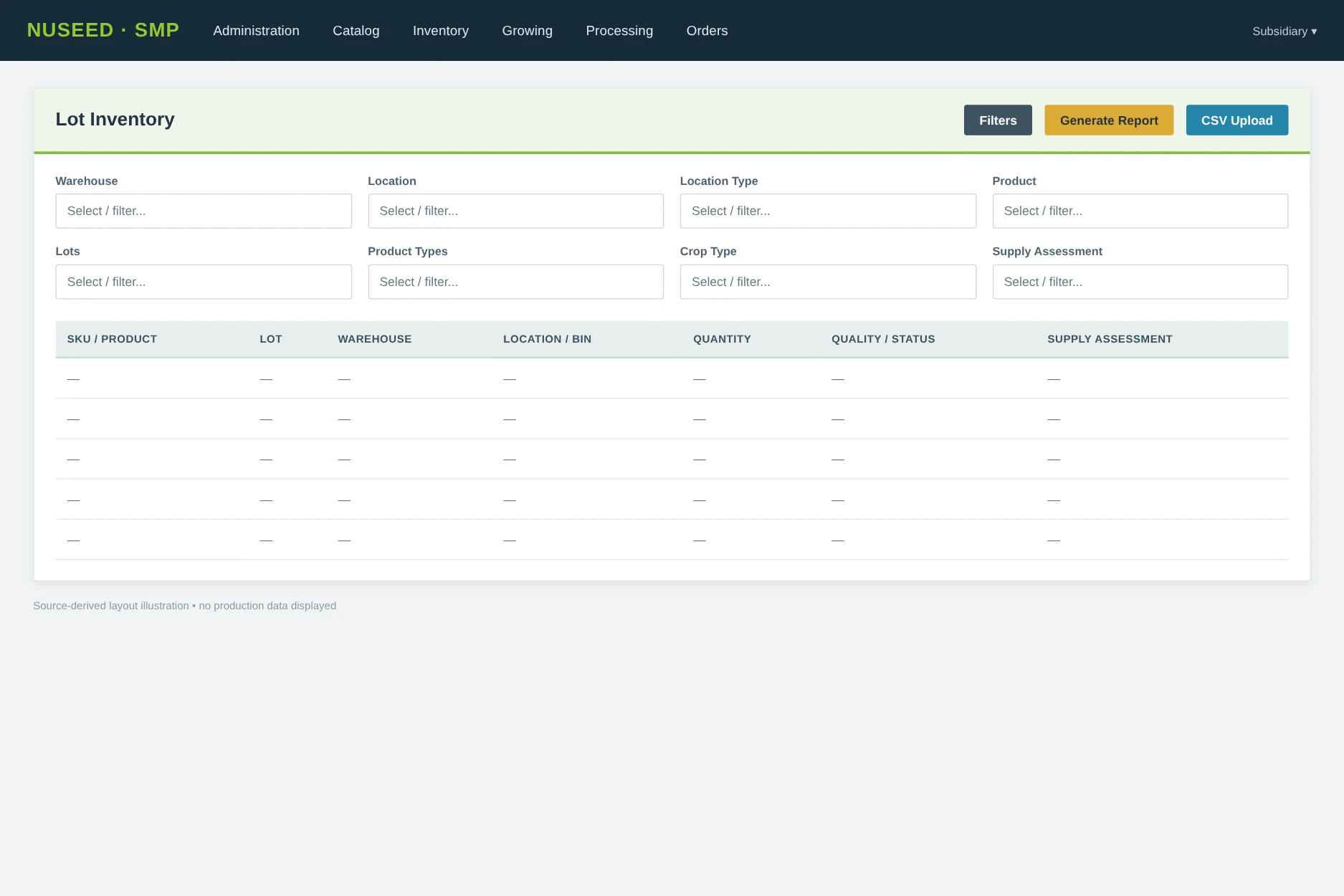
Nuseed lot inventory interface with product warehouse location lot and quality filters

12.2 Lot Inventory • product, location, lot and QA filters

The Lot Inventory screen has warehouse/location/product/lot and classification filters, a NetSuite-vs-SMP Only location selector, report generation and role-restricted CSV uploads. The table is derived from lot-location quantities and quality/status fields.

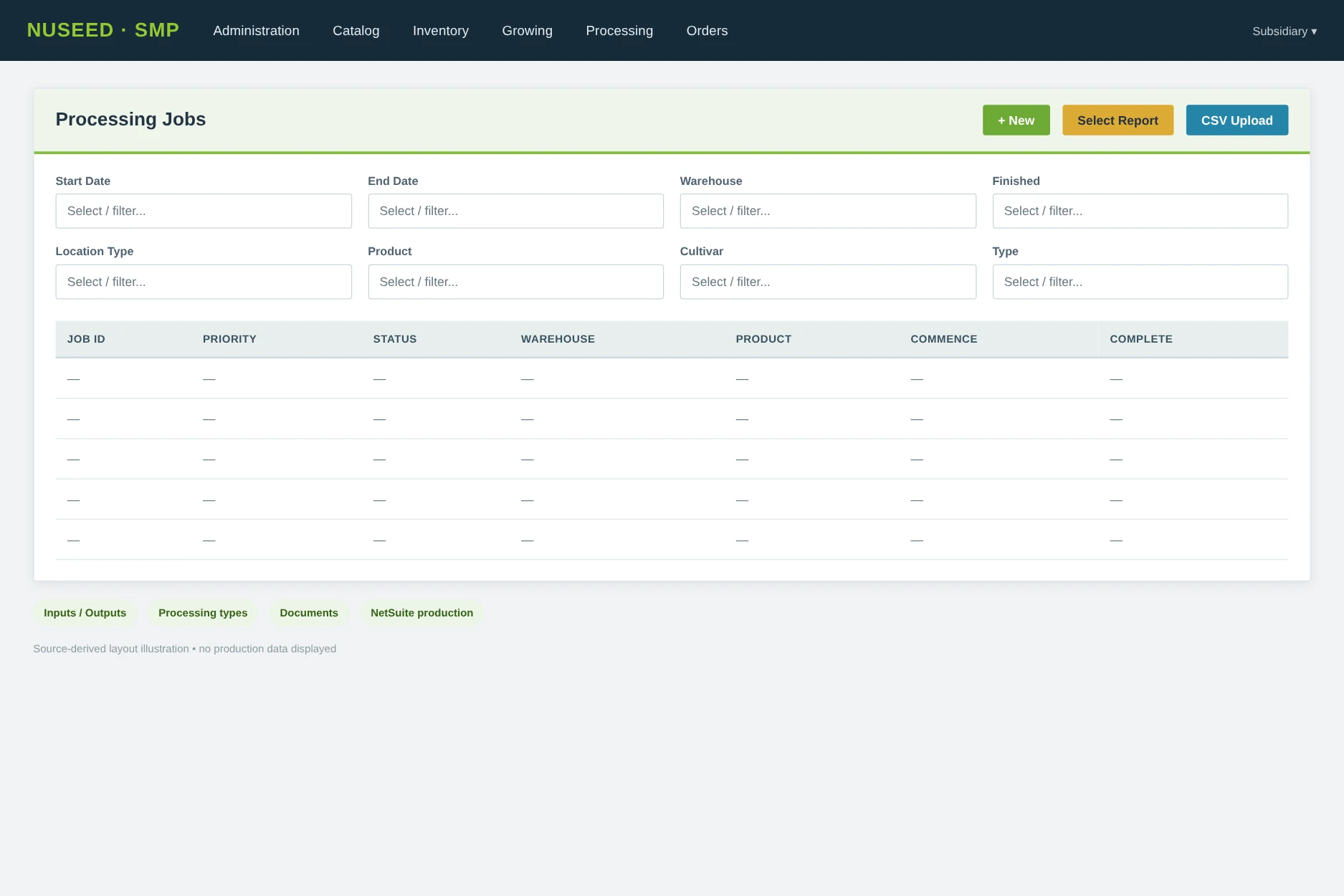
Nuseed processing jobs interface showing operational work in process

12.3 Processing Jobs • operational work-in-process

The application supports new processing jobs, unfinished/finished filters, priority/importance, warehouse, product and production types, expected vs actual dates, input/output items, document uploads, reports and NetSuite production messages.

Nuseed production management interface from field planning through harvest

12.4 Production Management • field-to-harvest workflow

Production Management provides searchable field/production entries, report selection, CSV upload and links into planning, planting, inspections and harvesting. Production fields link NetSuite products and grower contracts to subsidiary-aware field data.

Nuseed shipping manifest interface for NetSuite sales and warehouse transfer execution

12.5 Shipping Manifests • sales / transfer execution

Order-linked shipping workflows support state and warehouse filters, creation, dispatch paperwork, pallets, pick lists, shipping documents and transfer receiving. The actual fulfillment payload is built from inventory movement events.

Nuseed quality testing and release authorization workflow

12.6 Quality / Release • testing and approval path

Tests, result checks, documents, release authorization, approver comments, lot/lot-location linkage and quarantine states are supported by the current model and controllers. Exact composite presentation varies by test/detail and approval page.

14 / BUYER QUESTIONS

NetSuite integration and agricultural operations: FAQs

Questions we hear from businesses with specialized workflows that extend beyond their ERP.

When should an agricultural business integrate NetSuite with specialized operational software?
When field production, processing, quality, inventory, or fulfillment processes require information and decisions that standard ERP screens do not adequately capture. The first step is to identify which system owns each business record and where handoffs fail.
Can NetSuite remain the ERP while employees use a purpose-built operating system?
Yes. The Nuseed implementation connects relevant NetSuite products, orders, customers, warehouses, subsidiaries, and inventory transactions with specialized workflows inside the Seed Management Platform. Data ownership and synchronization rules must be defined for each integration.
Can NetSuite integration support production and work-in-process (WIP) tracking?
Yes. Nuseed’s processing jobs associate status, priority, inputs, outputs, timing, warehouses, and related orders. This supports operational WIP visibility. A separate financial WIP cost-ledger integration is not established by this case study.
How do you connect lot traceability, quarantine, and inventory reconciliation?
The application maintains lot identities and location-level movement history, records quality and nonconforming states, and compares operational inventory with NetSuite inventory snapshots by product and warehouse. The exact reconciliation rules depend on the operation.
Do we need to replace or heavily customize our ERP?
Often, no. Nuseed illustrates an approach in which specialized workflows operate outside the ERP while relevant transactions and reference data stay connected. Ayoka evaluates existing systems before recommending replacement or customization.
What happens if an integration transaction fails?
The documented SMP records transaction status and error details, supports notifications to authorized users, and provides controlled retry functions in its synchronization administration view. These capabilities support the investigation and recovery of integration exceptions.
Can similar integration principles apply beyond agriculture?
Yes. Production, distribution, logistics, and other operationally complex businesses often face the same challenge: work crosses specialized systems while management needs dependable relationships between orders, inventory, tasks, exceptions, and enterprise records.
16 / HOW THIS CONNECTS TO AYOKA TODAY

Your ERP can stay. The operation can work better together.

Nuseed demonstrates Ayoka's experience connecting complex workflows to the enterprise systems a business already uses. Ayoka's B.O.S.S. Business Operation Software System applies an integration-first approach to production visibility, inventory, quality, handoffs, and operational decisions.

Through Ayoka's Rent Custom Software model, clients can acquire tailored integrations and operational capabilities without commissioning a conventional large upfront software build.

This is an Ayoka custom integration case study, not a claim that Nuseed purchased or deployed B.O.S.S.

WHAT'S NOT CONNECTING?

Tell us where work gets stuck between systems.

We'll start with the process, the data you have, and the decisions your team needs to make.

Start a conversation Explore B.O.S.S. →

Start the Conversation

Tell us what you’re seeing. We’ll start with the operational problem and help determine what is getting in the way.

Captcha