Winning Is in the WIP™
Field work is only the beginning. The bigger question is whether the job is producing the profit you expected, on the timeline you expected, and how quickly completed work becomes cash.
Know the economics while work is underway. Turn completed work into cash faster.
A connected field-operations application for customer service orders, crew scheduling, labor and production reporting, chemicals and equipment, safety documentation, delivery tickets and commercial handoffs.

The opportunity is in the handoffs
In field services, work in process (WIP) is more than a technician being on site. It’s the full chain of unfinished operational commitments: a job waiting for crews or equipment, a service visit waiting for production records, a completed visit waiting for a signature, or an invoice waiting to be issued and paid.
Handoffs are organized around a customer service order (CSO). Scheduling, equipment and chemical associations, Daily Production Reports (DPRs), safety and testing documents, purchase orders, delivery tickets, and status flags are connected through the job record. That creates visibility into where work stands.
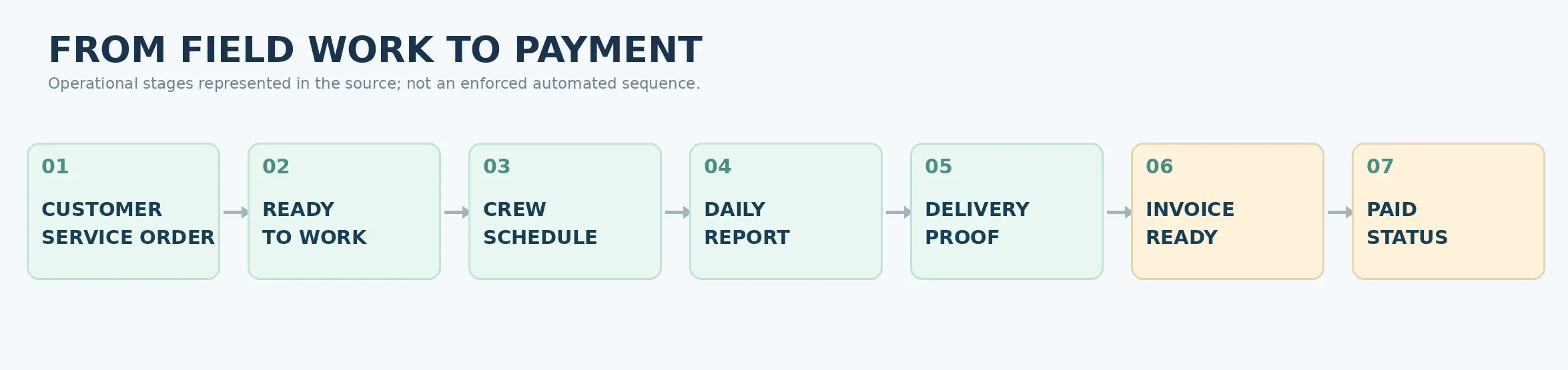
Operational path built around workflows.
What winning in the WIP looks like
An operations view of work underway
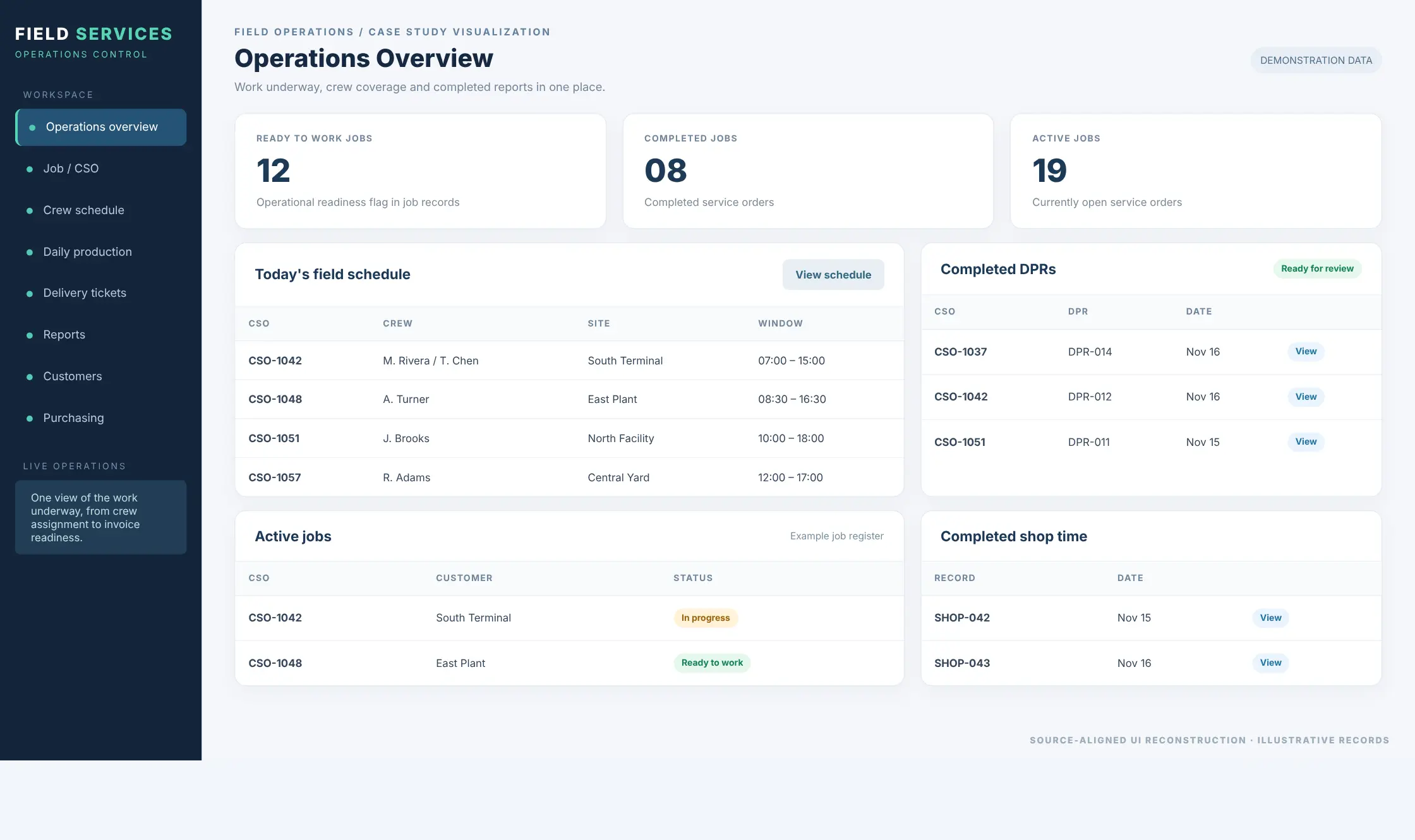
The home dashboard surfaces counts of ready-to-work, completed, and active jobs alongside completed DPRs, scheduled staff and shop-time activity. Rather than asking several people what is happening, supervisors can begin with the operational records already in the system.
Why this matters for WIP
Ready-to-work jobs represent commitments waiting to be executed. Completed DPRs represent documentation that can be reviewed or posted. Active service orders represent work still consuming capacity. The screens make these categories visible in one place, enabling measurable efficiency gains.
Crews, on-call coverage and production rate
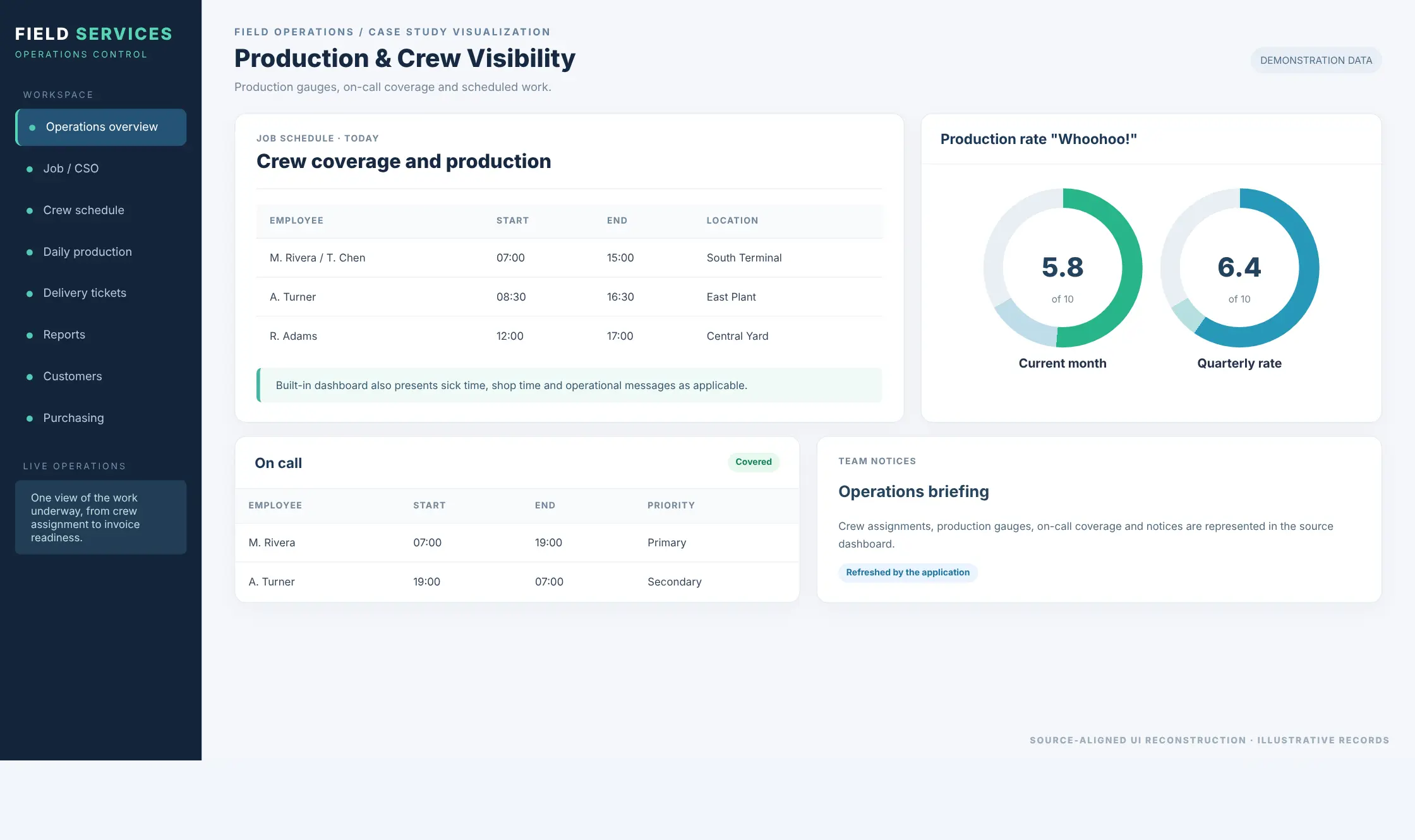
The separate operations dashboard combines the day’s job schedule with monthly and quarterly production-rate gauges, on-call staff, operational announcements and relevant time-off information. The calendar module also supports CSO/job schedules alongside on-call, sick, shop-time and other schedule categories.
Why this matters for WIP
Field capacity is lost when dispatch assumptions are wrong: the crew is unavailable, a work window conflicts with another assignment, or an on-call responsibility is unclear. Scheduling and availability views give operations a place to reconcile those conflicts before they become stalled jobs. Because the same people may support several types of work, the scheduling decision also affects what other revenue and margin the company can produce with that capacity.
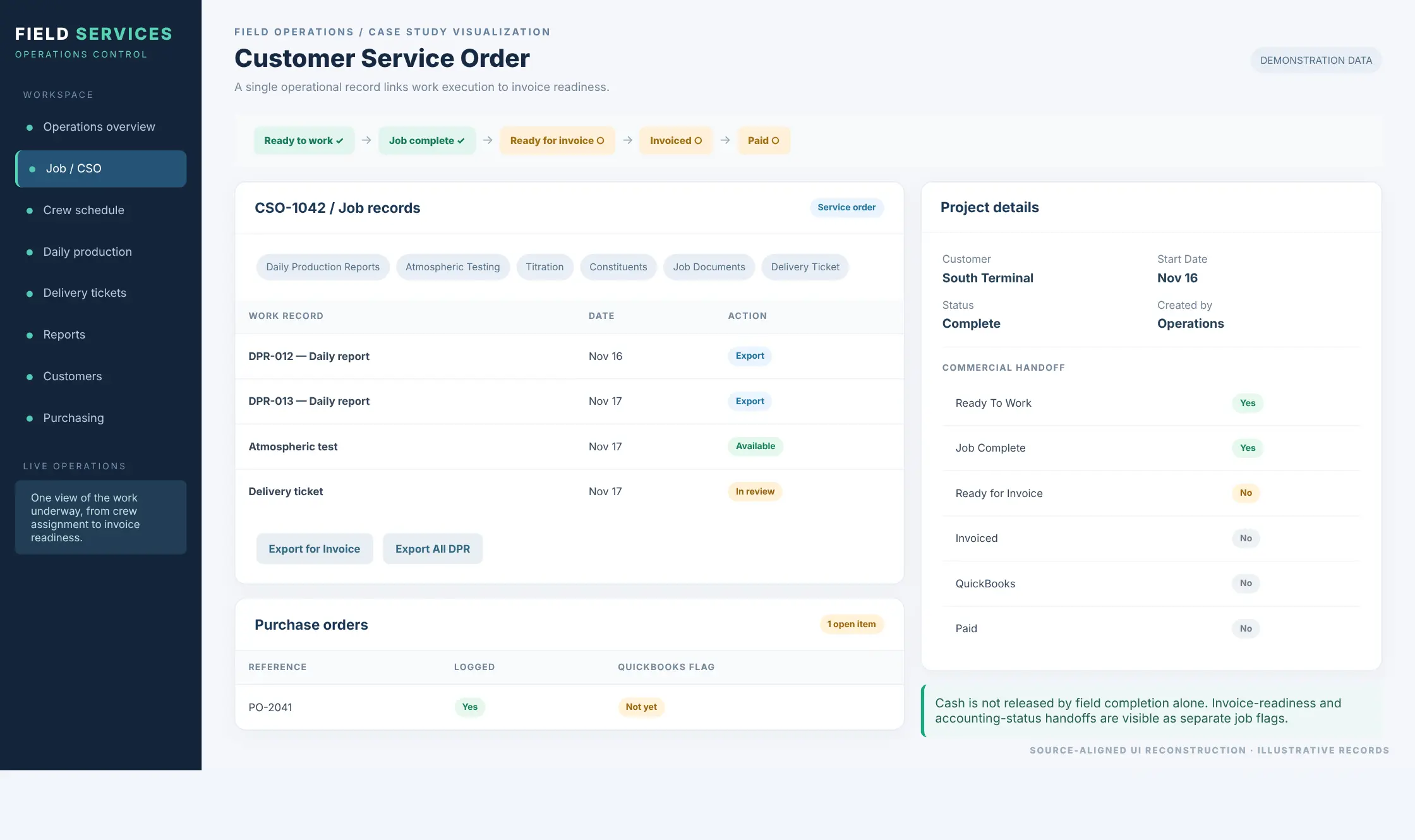
The service order connects operations to job economics and cash
A CSO is the spine of the application. The job detail page brings together Daily Production Reports, purchase orders, test logs, job documents, delivery tickets, quotes and safety materials. It also exposes distinct markers for Ready To Work, Job Complete, Ready for Invoice, Invoiced, QuickBooks and Paid.
The bigger commercial question
A complete job does not, by itself, tell leadership whether the work performed as economically as expected or whether the business is ready to bill. The CSO brings together the operational records needed to review what happened on the job, while the page deliberately separates completion from invoice readiness, invoiced status, QuickBooks recording and payment. A team can identify a completed CSO that remains outside the invoicing queue, then examine its DPRs, tickets and purchasing records before the handoff.
Did the job earn the profit you expected — and is that profit turning into cash on schedule?
If labor, chemicals, materials, purchasing or schedule performance moved away from plan, margin may have changed before the job was finished. If the field work is complete but DPRs, signatures, purchase orders, delivery tickets or accounting handoffs are still open, the earned result may still be WIP tying up cash.
Daily reports protect the value of work performed
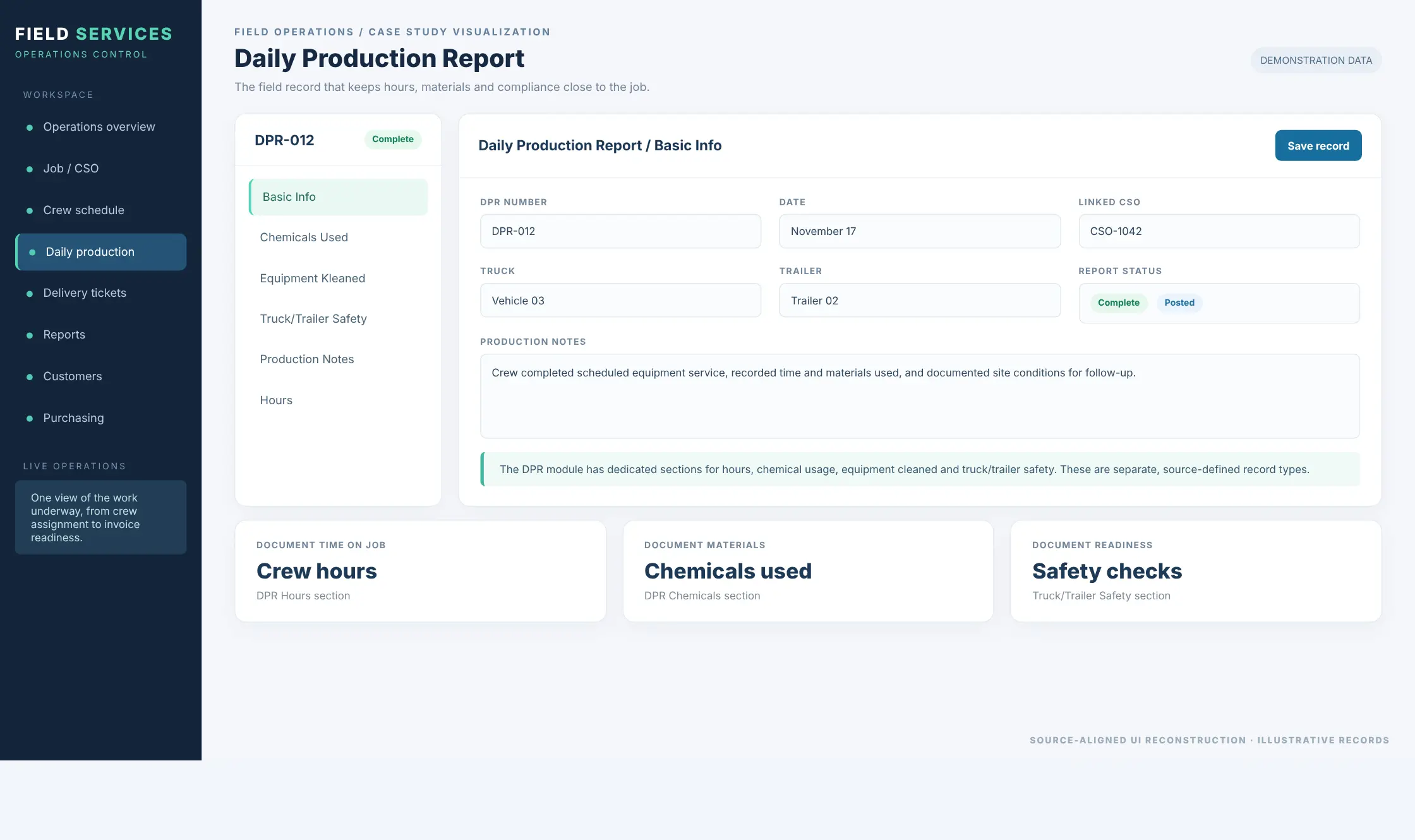
The DPR editor is structured into Basic Info, Chemicals Used, Equipment Kleaned, Truck/Trailer Safety, Production Notes and Hours. Each report is linked to a job and includes its number, date, truck, trailer, notes and completion/posted status. The controller also supports PDF exports, including exports organized for invoicing.
What the report makes visible
A field-service crew completes the work physically while labor, materials or compliance records are still incomplete. Recording the work in a structured DPR creates traceable context for supervisors reviewing job completion and assembling invoice support. Those same labor, chemical and equipment records are also the raw inputs leadership can use to understand why a job performed better or worse than expected.
Delivery tickets create a signed service record
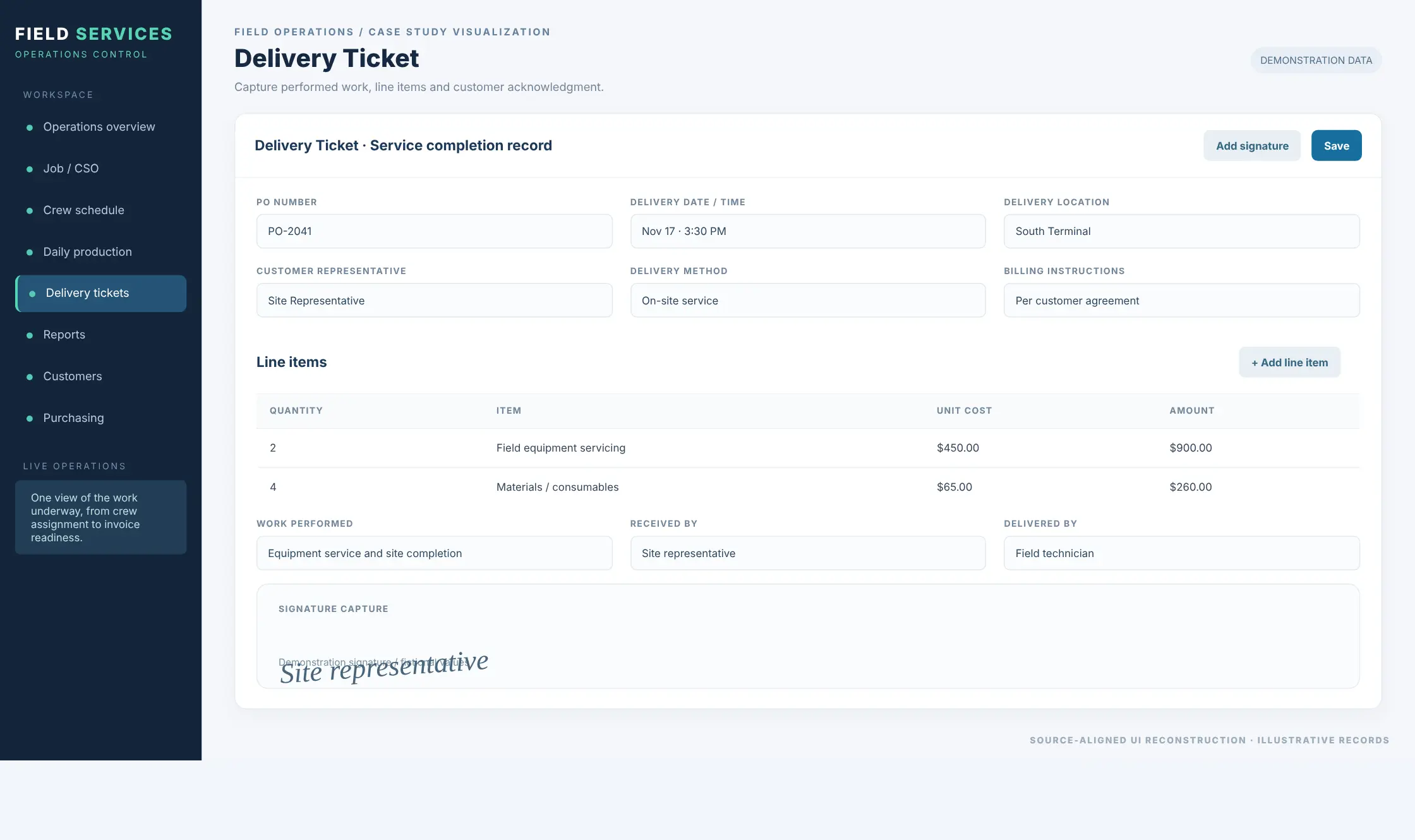
The delivery-ticket form captures customer and location, date/time, PO number, representative details, billing instructions, line items with quantities and costs, work performed, and an electronic signature. The corresponding controller accesses stored signature documents through the document service and an AWS S3 presigned URL.
A specific WIP win
When a service visit is complete but the customer’s acknowledgment or line-item details are missing, the handoff to invoicing may stall and billable work may be harder to defend or recover. Capturing those details as part of the delivery-ticket record gives operations a concrete artifact to review, follow up on and use in the commercial closeout.
A field-service WIP scenario
Consider a team dispatched to service equipment at an industrial facility. The work is scheduled, the crew arrives, and the work finishes successfully. But the business does not win merely because the truck leaves the site. It wins when leadership understands how the job actually performed, the work is documented and commercially complete, and the expected economic result is moving toward collection.
One job, five opportunities to unlock process
What can be measured in an actual deployment
Where estimate data is available, compare planned labor with recorded crew hours.
Compare expected inputs with chemicals, materials and purchasing recorded against the job.
Track elapsed days from completed job to invoice-ready status.
Track open purchase orders per CSO and unresolved supplier costs.
Track time from invoice to payment.
The supplied case study demonstrates the operational source records. Where quote, estimate and cost data are available, those records can also support planned-versus-actual job economics and margin analysis.
What this demonstrates for Field Services
This solution demonstrates the value of bringing dispatch, service execution, documentation and commercial closeout into a coherent operational system. It is especially relevant to organizations whose crews work at customer locations, use equipment or chemicals, produce inspection or safety records, and need timely evidence that work is finished before they bill.
The business problem
The constraint is typically whether the information produced around that service reaches the right people in time to understand whether the job is still performing to plan, schedule the next assignment, close the current job, issue the invoice and collect payment.
Ayoka’s approach
Start with the business metrics and KPI’s: expected margin, labor and material performance, schedule, invoice readiness, cash timing, or whatever actually defines winning for that operation. Trace the existing workflow and how work is shared among teams or operators. Trace the handoffs from order intake to dispatch, field completion, invoice readiness and payment. Assess the data, screens and systems that move work forward. Model the future state workflow, preserving the goodness of what’s in place with modifications that connect the vision and Commander’s Intent with the deep experience from the operators. That is how software integration can help a field-service business scale with speed without automatically adding people.
Define what leadership needs to know and what business result matters.
Follow the handoffs from order intake through dispatch, completion, invoice readiness and payment.
Keep the business rules and operator knowledge that are already working.
Connect people, systems and data around the next required action.
Questions field-service leaders ask
What is work in process (WIP) in field service operations?
Why can a completed field job still be unfinished commercially?
Can field service software show whether a job is tracking to the profit we expected?
How can field service software reduce invoicing delays?
How do Daily Production Reports and delivery tickets support billing?
Can field service software connect scheduling, purchasing and accounting?
What field-service WIP metrics can leadership track?
When does custom field service software make sense instead of an off-the-shelf field-service package?
Where is expected profit leaking out of your field jobs — and where is completed work still waiting to become cash?
Labor running above estimate? Chemical or material costs moving? Extra scope going uncaptured? Crew capacity being pulled to the wrong job? Or completed work still waiting on reports, signoff, purchasing or accounting? That is the practical place to begin.
- Show us where job economics begin to move away from plan.
- Identify the operational handoff affecting margin, capacity, billing or cash.
- Determine whether the answer is workflow, integration, reporting, decision support or custom software.
Start the Conversation
Tell us what you’re seeing. We’ll start with the operational problem and help determine what is getting in the way.