Legacy Application Modernization Services | Ayoka Systems
Legacy application modernization services

Legacy Application Modernization Services

Preserve what your software knows. Modernize what is holding the business back.

Your old application may contain years of business decisions, calculations, exceptions, customer commitments and operating knowledge. Ayoka starts by understanding what should be preserved before recommending what should change.

24 years of software engineering 100% U.S.-based Software, data, ERP & industrial systems
Modernization starts with understanding

The old technology is visible. The business knowledge inside it is the part you cannot afford to lose.

A legacy application can look outdated while still performing work the business understands deeply: pricing rules, scheduling logic, customer exceptions, production decisions, inventory treatment, billing triggers, approvals, reports, handoffs and years of lessons learned.

Modernizing that system is partly a technology problem. Modernizing the business knowledge inside it is a systems-engineering problem.

Industry modernization strategies are often described as retain, retire, rehost, replatform, refactor, rearchitect or rebuild. Ayoka starts one step earlier: determining what business knowledge must survive before choosing the technical strategy.

Why companies finally call

Legacy software often becomes urgent before anyone planned to replace it.

01 / PEOPLE

The original developer is gone.

The person who understood the code retired, left, became unavailable or never transferred enough knowledge for someone else to support the system confidently.

02 / RELIABILITY

The application has become fragile.

Crashes, hangs, old dependencies, unsupported components or increasingly expensive changes make every enhancement feel riskier than the last.

03 / PLATFORM

The environment is moving on.

Windows upgrades, database changes, browsers, servers, security requirements or vendor end-of-life decisions are forcing a conversation the business postponed.

04 / CUSTOMER

A major customer wants something new.

EDI, portals, APIs, reporting, traceability, security or a new workflow can turn a previously tolerable legacy system into a constraint on revenue.

05 / SCALE

The software outgrew its original job.

A Microsoft Access database, desktop application or departmental tool became operationally critical without ever being designed for the size or importance it now carries.

06 / CHANGE

The business changed around it.

New locations, acquisitions, products, customers, integrations and operating rules have accumulated around software that still reflects an earlier version of the company.

Institutional memory

A legacy application can be a map of decisions nobody wrote down anywhere else.

The screen may look like an old Access form or a Visual Basic application, but the important part is often hidden in the rules: why one customer receives a different calculation, why a status changes only after a particular event, why an order cannot be scheduled on one line, why an invoice waits for a certain date, or why a field that looks useless is actually tied to a downstream process.

A code conversion can reproduce behavior. Good modernization first determines which behavior is intentional, which behavior is obsolete and which behavior represents hard-won operating knowledge.
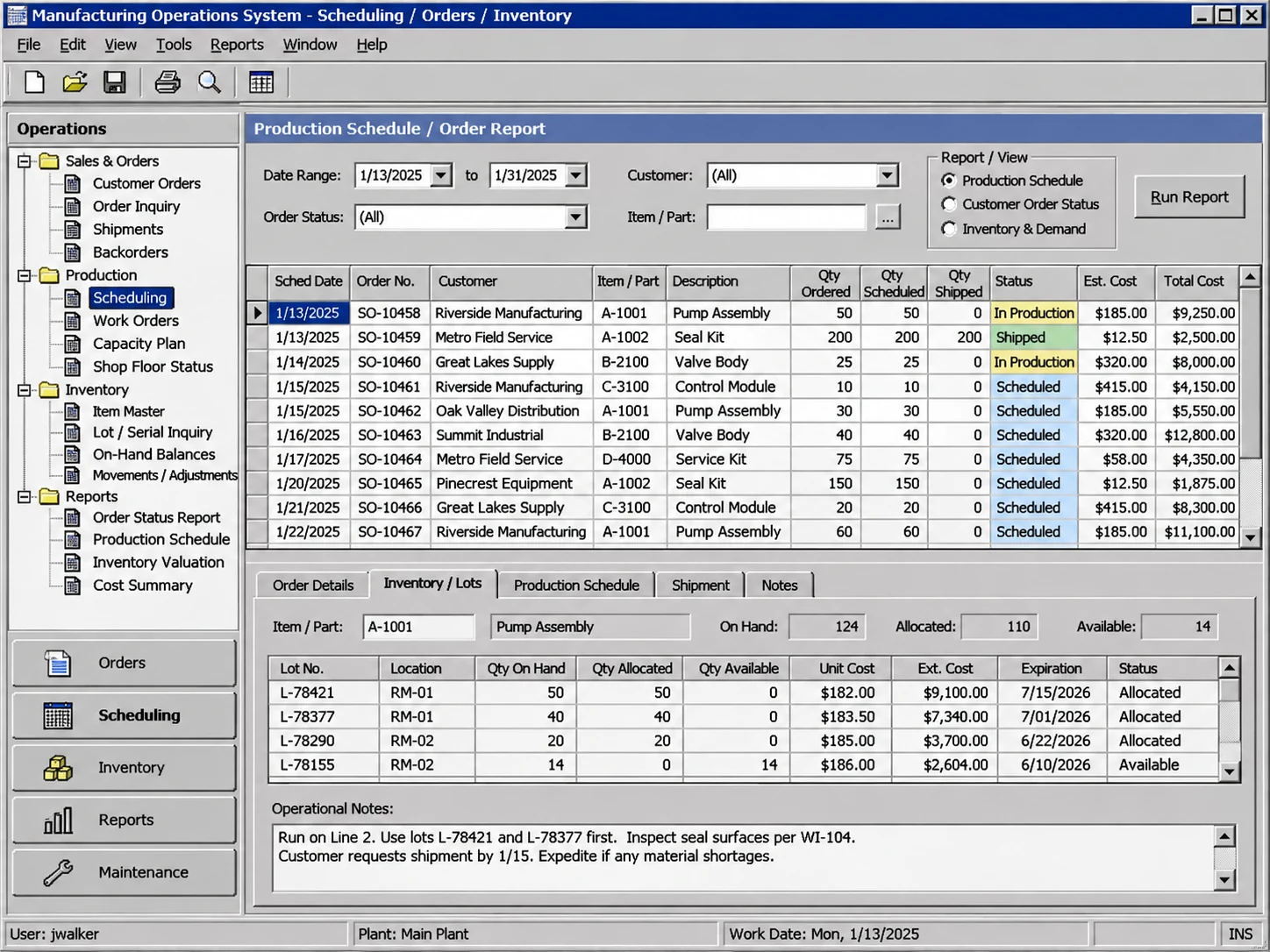
The customer is not primarily afraid that the software is old. They are afraid of losing what the old software knows.
Representative legacy desktop operations application with scheduling, inventory and order information
Representative legacy interface. Fictional data and reconstructed UI used to illustrate the kinds of line-of-business systems organizations may need to assess and modernize.
Start with what they love

Before we ask what should change, we ask what you would hate to lose.

Organizations often arrive saying, “Just rebuild exactly what we have.” That may be the right answer in places. It can also preserve years of workarounds while accidentally removing the parts people value most.

Ayoka starts with what users and operators already understand, then challenges assumptions where the current system no longer serves the business.

01

What does the current system do unusually well?

The useful answer may not be visible in a requirements document.

02

Which calculations took years to get right?

Pricing, costing, allocation and exceptions often carry institutional history.

03

What would users say the old system does better?

That is often where the highest-risk modernization mistakes hide.

04

Which odd-looking rules exist for a good reason?

Before simplifying a rule, understand the customer, contract or operational event behind it.

Due diligence before prescription

Do not choose the rewrite before you understand the system.

Ayoka can begin with a paid legacy application assessment. The due-diligence work is designed to understand the application well enough to make a responsible decision about support, stabilization and modernization.

Expected outcome: current-state risks, business logic and workflow findings, architecture and interface map, recommended path, priorities and the basis for a realistic modernization plan.
01 / CODE

Review the application and source

Languages, frameworks, dependencies, build process, deployment, third-party libraries and areas where change is unusually risky.

02 / DATA

Understand the database and records

Schema, history, data quality, retention, calculations, identifiers, migrations and which records the business treats as authoritative.

03 / BUSINESS

Interview the people around the software

Operators, managers, accounting, IT and other stakeholders often understand different parts of the same system. The goal is consensus on intent, not compromise between conflicting assumptions.

04 / INTERFACES

Map what the application depends on

ERP, databases, files, APIs, EDI, PLC-connected systems, equipment, documents, reports, customer systems and manual handoffs can all affect the modernization boundary.

05 / DECISION

Recommend the right path

Maintain, stabilize, progressively replace or rebuild based on the economics, business objectives and risk rather than on a technology fashion.

The decision is not automatically “rewrite”

Sometimes the right modernization decision is to keep the current application running.

Old does not mean bad. If a system still supports the business and can be maintained responsibly, the economics may favor continued support while the organization plans its next move.

Maintain

Keep the existing system.

Best when: the application is supportable, the business is satisfied with what it does and a replacement would not yet create enough value to justify the disruption or investment.

Stabilize

Reduce immediate risk first.

Best when: the system has meaningful risk but the organization is not operationally or financially ready for a larger modernization program.

Progressive transition

Build carefully around the legacy core.

Best when: modern APIs, reporting, workflows or user experiences can be introduced without creating an even more complicated architecture.

Rebuild

Replace the system deliberately.

Best when: architecture, reliability, growth, security, integration needs, business change or the ongoing cost of enhancement makes continued investment in the old platform increasingly irrational.
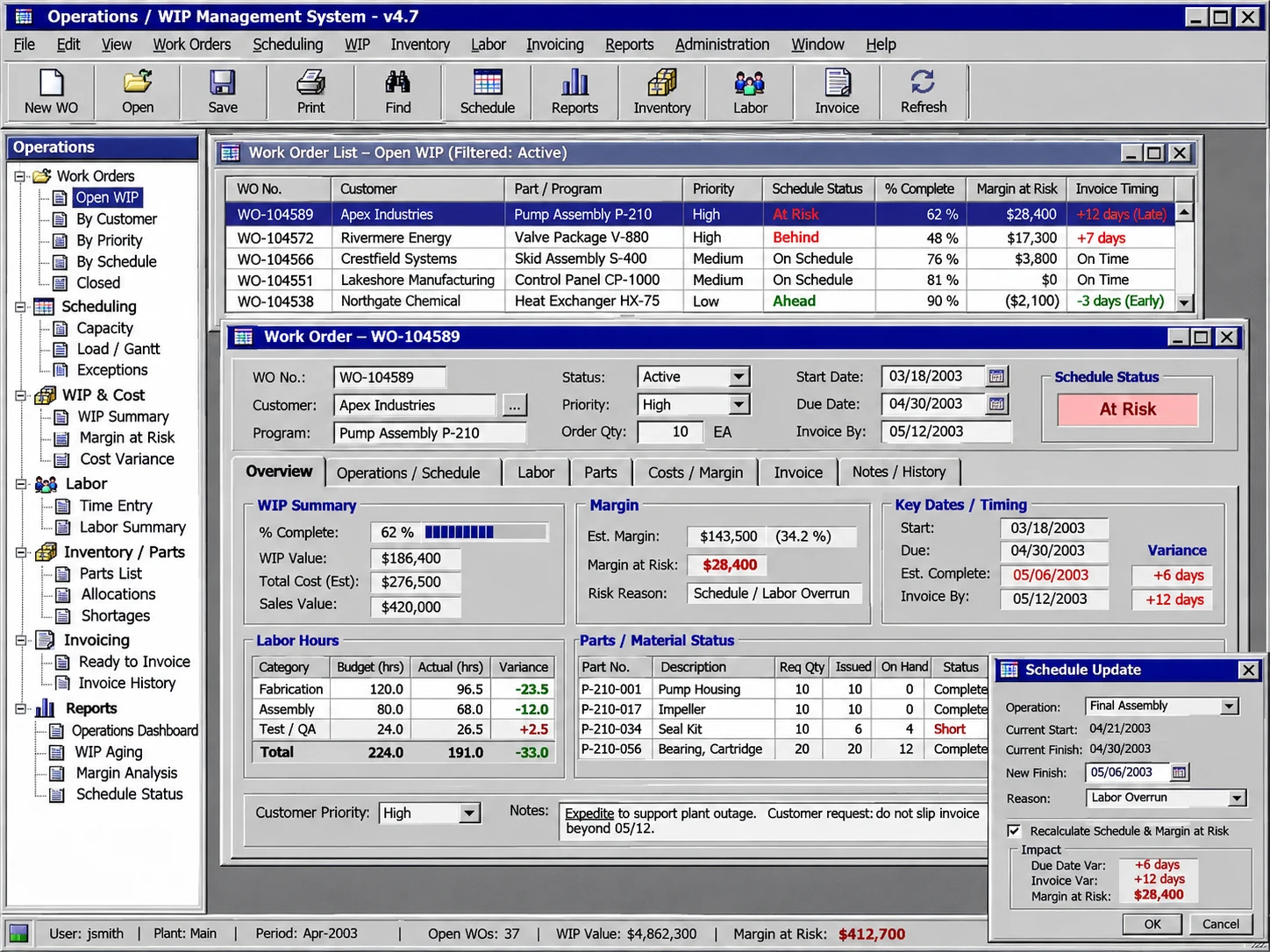
Representative Visual Basic style legacy work in process management application
Representative Visual Basic-style interface. Fictional sample data. The purpose is to illustrate how dense business rules can accumulate inside a long-lived internal application.
Reproduce vs. improve

“Build exactly what we have” sounds safe. It can preserve the wrong things.

The current application is valuable evidence. It shows how people actually work, which fields matter, what exceptions accumulated and what the business has learned. But it is not automatically the specification for the future system.

Ayoka uses the legacy software as a starting point, then reconciles what the software does with what stakeholders say they need and what the business is trying to accomplish next.

  • Preserve business rules that still create value.
  • Question workarounds that became permanent by accident.
  • Resolve conflicting stakeholder definitions before coding them into the replacement.
  • Improve the workflow where the old technology forced unnecessary steps.
Why modernization projects fail

A prettier interface can still be the wrong system.

Rebuilding screens instead of understanding intent

The replacement faithfully reproduces the old UI without understanding why the business behaves that way.

Technology chooses the architecture

The team starts with cloud, microservices or a new framework before defining the operational objective.

Exceptions disappear in discovery

The uncommon case may be the reason an important customer, contract or workflow still works.

Stakeholders never reach real agreement

Different departments use the same words to mean different things, and the conflict gets coded instead of resolved.

Data migration is treated as a file move

History, identifiers, relationships, units and operational meaning can be damaged even when every row technically transfers.

Connected systems are discovered too late

ERP, EDI, devices, reports, spreadsheets and customer interfaces can define the real modernization boundary.

AI changes the economics

AI makes rebuilding software easier. It does not make the decisions easier.

AI can increasingly read a repository, summarize code, generate documentation, produce test cases, convert routines, build APIs and scaffold a modern replacement. Those are useful accelerators.

The harder work is deciding what should exist after the conversion.

The application is part of a larger system

Modernization decisions can cross software, data, equipment, customers and financial systems.

A desktop application may be only one component in the operating chain. Replacing it responsibly means understanding the interfaces, responsibilities and dependencies around it rather than modernizing one box in isolation.

Customer / Supplier→ ERP / Accounting→ API / EDI / Files→ Legacy Application→ Database / Reporting→ Equipment / PLC / HMI

Ayoka does not need to own every component to understand that a change in one component can affect the others.

Our approach is influenced by systems-engineering and configuration-management discipline, including principles formalized in historical standards such as MIL-STD-2167A and MIL-STD-973 and carried forward through modern configuration-management and systems-engineering guidance. The commercial lesson is simple: know what is approved, what depends on it, who may change it and how the change will be verified.

Modernization in the real world

Preserving what matters while changing the technology is not a theoretical exercise.

Microsoft Access / Operational Planning

KAP

Ayoka transformed fragmented Access databases and specialized turnaround-planning rules into a centralized, repeatable and auditable planning platform. The value was not simply replacing Access. It was preserving and organizing the domain knowledge inside the planning process.

Read the KAP case study →

Aging Scheduler / SAP / Multi-Plant Production

WL Plastics

Ayoka modernized an aging production scheduler while preserving critical manufacturing knowledge, then connected SAP orders and inventory with line capabilities, scheduling, work orders, actual production and remaining WIP across multiple facilities.

Read the WL Plastics case study →

Production / Quality / Inventory / SAP

Sexing Technologies

Ayoka translated a complex multi-location production workflow into a centralized enterprise application spanning production, laboratory workflows, quality, inventory, warehouse transfers and SAP billing.

Read the Sexing Technologies case study →

Logistics / Sage / DocuWare / EDI

Intermodal Tank Transport

ITT’s operating software connected specialized logistics rules with quoting, route costing, tank assignments, customer and vendor interfaces, documents, job-cost information and financial workflows. That kind of business context is what modernization has to preserve.

Read the ITT case study →

Not ready to replace it?

We can take responsibility for the software you depend on today.

Modernization does not have to begin with a rewrite. If the current application can be supported responsibly, Ayoka can perform due diligence, take over maintenance and learn the business while you decide what should happen next.

Application Management & Maintenance →
Fit matters

The strongest modernization projects are collaborative.

Strong fit

  • The application matters enough that losing its business logic would hurt.
  • Leadership wants an independent recommendation, not a predetermined rewrite.
  • Operators and subject-matter experts can explain how the business actually works.
  • The organization is willing to participate in discovery, testing and acceptance.
  • You want a U.S.-based software partner capable of learning the business and exercising judgment.

Probably not a fit

  • The only objective is the lowest possible development rate.
  • The organization expects the vendor to infer every business rule without stakeholder participation.
  • A technology choice has already been made and discovery is expected to justify it.
  • No one is available to validate the replacement against real workflows and realistic data.
  • The project is treated as a screen-for-screen clone with no willingness to examine intent.
Legacy modernization FAQs

Questions buyers ask before changing software the business depends on.

What is legacy application modernization?
Legacy application modernization is the process of evaluating and updating an existing software system so it can continue to support the business with acceptable reliability, security, maintainability and integration. Modernization can mean continued maintenance, stabilization, modern interfaces around a stable core, progressive replacement or a full rebuild.
Should we rewrite or maintain our legacy application?
A rewrite is not automatically the right answer. If the current system still supports the business and can be maintained responsibly, continued support may be economically rational. A rewrite becomes more compelling when reliability, architecture, growth requirements, security, platform support, integration needs or the cost of enhancements make continued maintenance increasingly difficult.
Can Ayoka take over software if the original developer is gone?
Yes. Ayoka can begin with due diligence on software it did not build. We review the source code, database, deployment, dependencies, integrations, business rules and operating workflows so we can determine whether the application can be responsibly supported and what modernization path makes sense.
How do you preserve business logic during modernization?
Preserving business logic requires more than reading code. Ayoka combines technical review with stakeholder interviews, workflow discovery, data analysis, rule identification, interface mapping and validation with the people who use and depend on the system. The objective is to distinguish valuable operating knowledge from obsolete behavior before changing the technology.
Can AI modernize a legacy application?
AI can accelerate code analysis, documentation, testing, conversion and development. It does not remove the need to decide which business rules are still correct, resolve conflicting stakeholder expectations, understand interfaces, preserve institutional knowledge, validate data conversion and determine whether the replacement supports the business objective.
What does a legacy application assessment include?
A useful assessment typically covers source code, database structure, deployment, dependencies, integrations, security and support risks, business rules, workflows, stakeholder expectations, data quality and the practical economics of maintaining versus modernizing the system. The result should be a recommended path, not a predetermined rewrite.
Can Microsoft Access, Visual Basic or older .NET applications be modernized?
Yes. Access, Visual Basic, classic .NET and other long-lived desktop applications can often be maintained, stabilized, integrated or rebuilt. The important first step is understanding the business logic, data model and workflows inside the application before deciding which technology should replace it.
Do we have to move the application to the cloud?
No. Cloud migration is one possible modernization decision, not the definition of modernization. The right architecture depends on business requirements, security, connected systems or equipment, latency, data, uptime, support model and economics.
Can modernization be phased?
Sometimes. New services, integrations, reporting or user experiences can be introduced around a stable legacy core while risk is reduced progressively. In other situations, partial modernization creates unnecessary complexity and a full replacement is cleaner. Due diligence should determine which case applies.
What is the difference between legacy application modernization and legacy system modernization?
The terms overlap. Legacy application modernization usually focuses on a specific business application and its code, data, workflows and interfaces. Legacy system modernization can describe a broader environment that may also include infrastructure, databases, integrations, devices and adjacent platforms. Ayoka evaluates the application in the context of the larger operating system around it.
How long does legacy software modernization take?
The schedule depends on application size, business complexity, documentation quality, data migration, interfaces, testing requirements and stakeholder availability. Ayoka prefers to establish the current state and recommended modernization path before making a detailed schedule commitment.
Start with the system you cannot afford to lose

Tell us about the system you cannot afford to lose.

You do not need to arrive with a modernization architecture. Tell us what the application does, what changed, what is becoming difficult or risky, and what the business cannot afford to lose.

Ayoka can begin with due diligence, support of the existing system or a modernization assessment depending on what we find.

Start the Conversation

Tell us what you’re seeing. We’ll start with the operational problem and help determine what is getting in the way.

Captcha